CRT Simulation on OLED: What It Means for Your Games
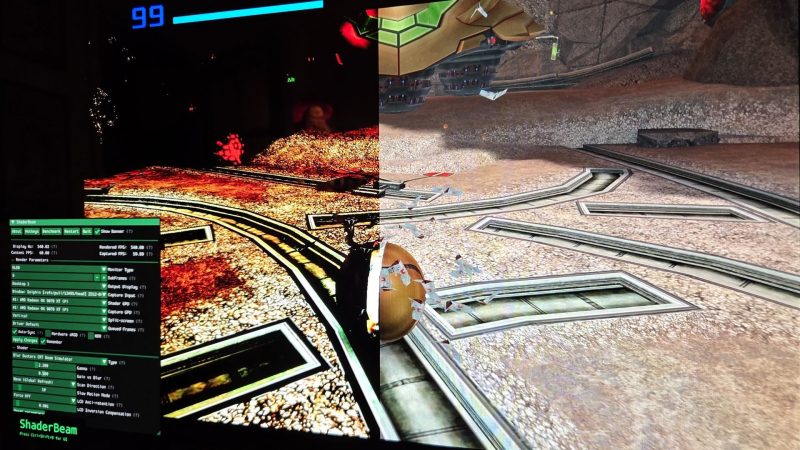
For players, this means smoother motion in retro and modern games without needing a supercomputer, but only if you have the right high-refresh OLED and can navigate bleeding-edge software. The industr…
For players, this means smoother motion in retro and modern games without needing a supercomputer, but only if you have the right high-refresh OLED and can navigate bleeding-edge software. The industr…
Key points - Blur Busters founder Mark Rejhon says people over 40 remember CRT motion clarity, while younger people have never seen it. - Nvidia's G-Sync Pulsar uses backlight strobing and rolling refresh to create perceived 1,000 Hz clarity, but only on Nvidia GPUs. - In late 2024, Rejhon and Timothy Lottes debuted an algorithm that simulates CRT phosphor fade on 240+ Hz displays. - The Asus ROG PG27AQWP-W is a 540 Hz OLED monitor with a 720 Hz mode at 720p, ideal for CRT simulation. - ShaderBeam, a standalone tool, requires perfect synchronization with display and input to avoid noticeable flashing.
Timeline - Mid-2000s: LCDs replace CRTs, offering thinner screens but worse motion clarity with ghosting. - Late 2024: Mark Rejhon and Timothy Lottes debut a breakthrough CRT simulation algorithm for 240+ Hz displays. - 2026: Nvidia's G-Sync Pulsar launches in gaming monitors, but not on OLEDs and only for Nvidia GPUs. - 2026: ShaderBeam tool splits from ShaderGlass to handle complex CRT beam simulation on Windows.
FAQ
Q: What is CRT simulation and why does it matter? A: It's a technique that mimics the motion clarity of old CRT monitors on modern displays, reducing blur for smoother gameplay. It matters because many gamers miss that CRT smoothness.
Q: Can I use CRT simulation on any monitor? A: No, you need a high refresh rate display, ideally 240 Hz or more. OLEDs are best because they can go completely black and get very bright, closer to CRT contrast.
Q: Why does Windows need to change for true CRT nirvana? A: Windows isn't built for the perfect synchronization required by CRT beam simulation. Dropping a single frame causes noticeable flashing, so the OS needs better timing support.
📰 Related Articles
What Sonic Racing Crossworlds Year Two Means for Players
This massive crossover lineup could attract fans of multiple franchises, but the game's underperformance suggests it may need more than star power to compete with Mario Kart.
What Hallowed Concepts Means for Risk of Rain 2 Players
This expansion signals a strong turnaround for Risk of Rain 2 under Gearbox, potentially winning back skeptical fans and attracting new players to the roguelike.
What Mafia 3's New Patch Means for Returning Players
For players, the patch smooths out long-standing frustrations that could block progress. For the industry, it shows older games can still receive meaningful support years after launch.
What Xbox's New XP Division Means for Gamers and Game IP
Xbox is doubling down on transmedia entertainment, which could mean more game-based movies, shows, and theme parks for fans. The leadership shuffle at Mojang may also bring fresh direction to Minecraf…
Darkhold Destiny: What Magic's New Marvel Set Means for Play…
This set deepens Magic's Universes Beyond strategy, giving players more Marvel-themed cards and collectors new chase treatments, while expanding the crossover narrative into comics.
What The Snatching-Beast Quest Means for Dragon's Dogma 2 Pl…
This quest encourages players to explore the world of Dragon's Dogma 2 and engage with its combat system, while also providing early-game rewards. It's a typical example of the game's side quests that…