Where Winds Meet: Best PC Settings for Peak Performance
Optimize Where Winds Meet on PC with these settings for higher FPS and smoother combat.
Where Winds Meet is a visual marvel, but its sprawling landscapes and real-time foliage can push your PC to its limits. If you're experiencing stutters or frame drops, don't blame your GPU just yet. Often, the culprit is a mix of Windows settings and in-game options that need fine-tuning. Here's how to get the best performance without sacrificing the game's breathtaking visuals.
### Start with Windows Optimizations
Before launching the game, ensure Windows is set up for gaming. Enable Game Mode by navigating to Settings > Gaming > Game Mode. This prioritizes system resources for your session. Also, turn on Hardware-accelerated GPU scheduling under Settings > System > Display > Graphics Settings. This reduces CPU overhead by letting your graphics card manage its memory more efficiently. If you're using a Ryzen 7900X3D or 7950X3D, keep Game Bar enabled because those CPUs rely on it for core scheduling.
Switch your power plan to Balanced instead of High Performance. Surprisingly, Balanced can deliver better sustained performance in games. Disable Game Bar (unless you have the mentioned Ryzen CPUs), Game Capture recording, and background app refresh for unnecessary apps.
For NVIDIA RTX users, update to the latest DLSS override to avoid outdated templates. AMD users should focus on upscaling efficiency and frame caps.
### In-Game Display and Upscaling
Set the game to Fullscreen mode, not borderless windowed, for maximum performance. Turn off motion blur to keep fast combat clear.
For upscaling, DLSS Quality is the sweet spot for NVIDIA RTX cards, offering a 15-20% performance boost with minimal visual loss. AMD users can use FSR Quality at 66% for similar gains, while XeSS Ultra Quality often looks even better if available. Frame Generation can boost FPS but adds input latency, so test it during combat to see if it affects your timing.
### Visual Quality Settings That Matter
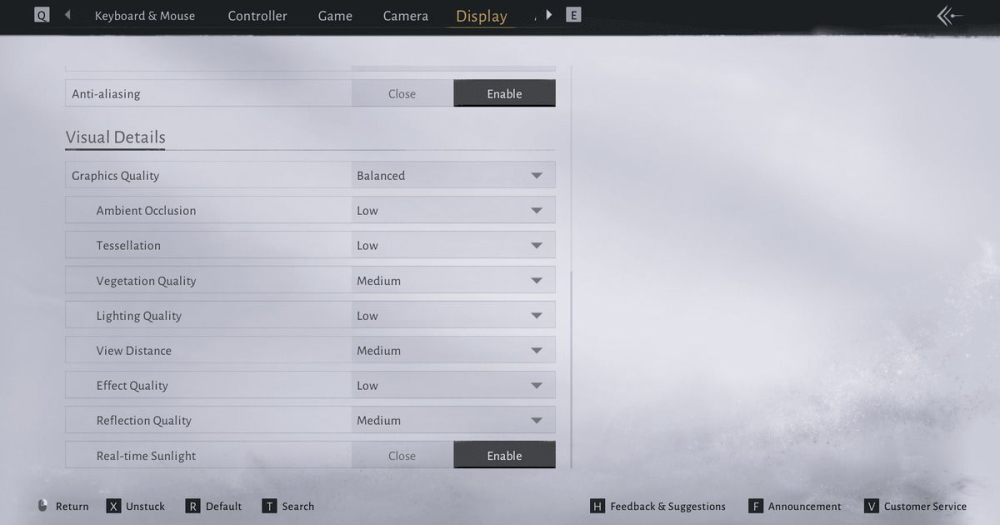
To eliminate heavy frame dips, focus on these sliders:
- Shadows: Lower to Medium or High, as ultra shadows are demanding. - Vegetation: Reduce density to Medium or High; the game's foliage reacts in real time, which is costly. - Volumetric effects: Turn down or off, as they impact performance heavily. - Textures: Keep at High if you have enough VRAM, but lower if you encounter stutters.
These adjustments will stabilize frame times and keep combat smooth.
### Advanced Tweaks: Memory, Storage, and UI
For a smoother experience, install the game on an SSD, not an HDD, because the streaming system relies on fast read speeds. While 16GB RAM is playable, 32GB is recommended for optimal performance.
UI elements can also hurt performance. Set chat to Exploration Mode instead of Social Mode, disable large damage numbers or excessive banners during fights, and reduce overlay clutter if using third-party tools.
### Troubleshooting Common Issues
If you still face problems, check for these common culprits:
- Stuttering during combat: Often caused by incomplete shader compilation. Let the game finish compiling shaders before diving into action. - FPS drops in towns: Reduce crowd density or lower shadow quality. - Input lag: Disable Frame Generation or lower your resolution. - HDR issues: Adjust brightness and HDR settings to avoid washing out details.
Monitor your FPS and frame times using tools like MSI Afterburner to see what's causing bottlenecks.
### The Takeaway
Optimizing Where Winds Meet is about balancing visual fidelity with performance. By tweaking Windows settings, choosing the right upscaling method, and adjusting key visual options, you can enjoy smooth combat and stunning scenery without stutters. Start with these recommendations and fine-tune based on your hardware. With the right setup, you'll be ready to master the martial arts world with confidence.
📚 Related Guides
Qianye Showdown Awaits in Where Winds Meet 2.2
For players invested in Where Winds Meet's narrative, this patch delivers long-awaited closure to the Hidden Mountain arc and a decisive confrontation with Qianye. It also signals the game is ready to…
Where Winds Meet's Hidden Mountain Expansion Goes Eastern Steampunk
Where Winds Meet is getting a 2.0 update with the Hidden Mountain expansion on July 23, bringing an Eastern Steampunk world full of ancient machinery, floating cities, and mechanical bosses.
Where Winds Meet: Heaven's Threshold Drops August 20
Where Winds Meet's Hidden Mountain expansion continues August 20 with Heaven's Threshold, bringing giant mechanical bosses and a new mountain region.
Is the Where Winds Meet Monthly Pass Worth It? A First-Charge Value Guide
The $5 Monthly Pass in Where Winds Meet offers great first-charge value with Echo Beads, daily Jade, and VIP access—here's the verdict.
Where Winds Meet: Mobile vs PC Performance Showdown
Compare Where Winds Meet on PC and mobile: FPS, graphics, controls, and cross-save tips for a seamless experience.
Where Winds Meet Pre-Registration Rewards: How to Claim Them
Learn how to claim Where Winds Meet pre-registration rewards, including all milestones and steps to avoid missing out.