Where Winds Meet: Mobile vs PC Performance Showdown
Compare Where Winds Meet on PC and mobile: FPS, graphics, controls, and cross-save tips for a seamless experience.
Where Winds Meet has finally landed on both PC and mobile, and players are diving into a vast world that follows them everywhere. But the big question is: which platform delivers the best experience? We've put together a comprehensive performance comparison to help you decide, covering frame rates, graphical fidelity, controls, and the all-important cross-save functionality. Whether you're a hardcore PC gamer or a mobile warrior, this guide has the facts you need.
### PC vs Mobile: Core Differences PC players get the full package: brutal Legend difficulty, support for DLSS, FSR, and XeSS upscaling, and deep customization options. You can tweak mouse controls to perfection and enjoy real-time cutscenes that keep you immersed. Mobile, on the other hand, keeps things more streamlined. It runs on Story or Recommended modes, with Assist Deflection always enabled, and swaps real-time cutscenes for pre-rendered video clips. Graphically, mobile tops out at a resolution of 2868x1320 on the latest iPhone, while PC can scale much higher depending on your hardware.
### Frame Rate and Performance Benchmarks Both platforms target a smooth 60 FPS, but the hardware required differs significantly. On the high-end mobile side, the M5 iPad Pro manages 57 FPS as a 1% low at 2420x1668 resolution, with a frame time of 17.5ms and a surprisingly low RAM usage of just 2.25GB. The iPhone 17 Pro Max also hits 57 FPS at 2868x1320, using 2.15GB RAM. Even the RedMagic 11 Pro, a gaming phone, dips to 48 FPS during intense action, though it does use a hefty 65-74% of its RAM. On PC, an RTX 2070 Super can lock in a steady 60 FPS after enabling DLSS, which boosts performance by 40-60%. For the best PC experience, run the game in DX12 mode, lower settings, and install it on an NVMe SSD to cut load times and reduce stuttering.
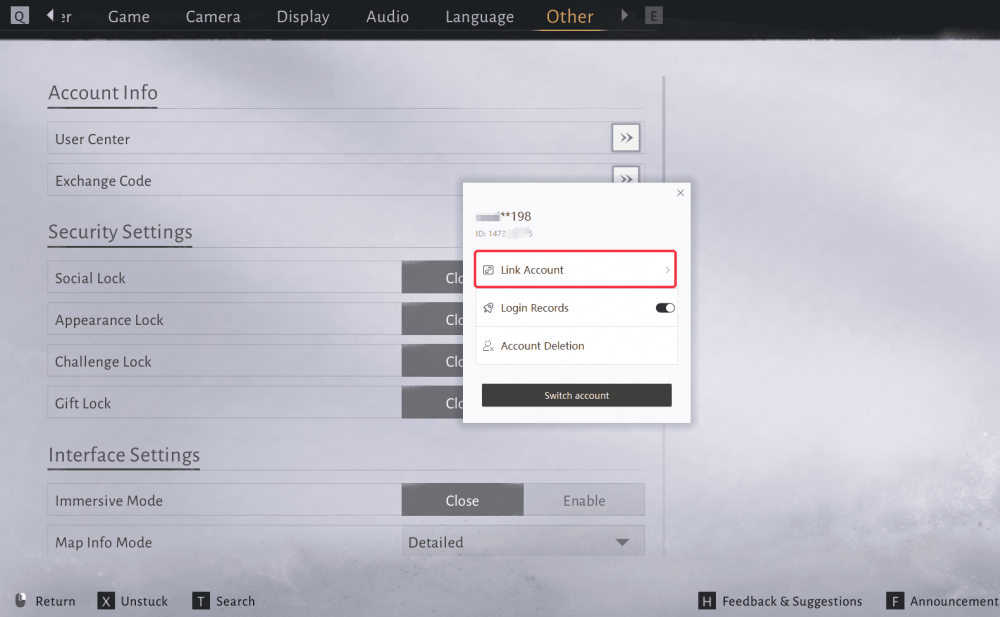
### Cross-Save and Cross-Play: Seamless Progression One of the standout features is full cross-progression across Steam, Epic, the PC launcher, PlayStation, and mobile (iOS and Android). To take advantage, you must link your accounts before creating a character. The process is simple: go to Settings > Other > User Center > Link Account, choose your platform, and log in. Once linked, your character data, progress, and purchases sync automatically. If you're moving from PC to mobile, log into PC first, note your ID, then on mobile (available now) log in with the same platform before character creation. The same applies in reverse. Remember, you cannot unlink accounts manually; if you run into issues, you'll need to contact support at support@wherewindsmeet.global.netease.com to delete your data. Also, make sure you have no existing characters on either account before linking, and pre-link any PS pre-orders.
### Visuals and Controls: What Feels Different PC offers a visual feast with real-time cutscenes and support for upscaling technologies like DLSS and FSR, which can dramatically improve performance. You can rebind Parry and Dodge to mouse buttons for tighter control. Mobile, however, relies on touch controls with no custom bindings. To enable cross-platform play, toggle Settings > Other > Cross-Platform. The graphics on mobile are still impressive, but the lack of custom controls might be a deal-breaker for some. Interestingly, mobile uses video cutscenes to keep performance smooth, but this can increase data usage, so keep an eye on your plan.
### Load Times and Stuttering PC players may encounter LOD stuttering and real-time cutscene hitches, but an NVMe SSD can slash load times significantly. Mobile, by contrast, uses video clips, which keeps the action buttery but can spike data usage. If you're on PC, let the game idle in the menu to build the shader cache before diving in, which can help reduce stutters.
### Final Takeaway Choosing between mobile and PC for Where Winds Meet boils down to your priorities. PC offers the most immersive experience with higher difficulty, better graphics, and customizable controls, but it demands a capable rig. Mobile provides convenience and portability, with surprisingly solid performance on high-end devices, but with simplified controls and visual compromises. Thanks to seamless cross-save, you don't have to pick one forever—link your accounts and switch between platforms as needed. As of September 2026, both versions are live, so jump in and explore the world on your terms.
📚 Related Guides
Where Winds Meet's Hidden Mountain Expansion Goes Eastern Steampunk
Where Winds Meet is getting a 2.0 update with the Hidden Mountain expansion on July 23, bringing an Eastern Steampunk world full of ancient machinery, floating cities, and mechanical bosses.
Where Winds Meet: Heaven's Threshold Drops August 20
Where Winds Meet's Hidden Mountain expansion continues August 20 with Heaven's Threshold, bringing giant mechanical bosses and a new mountain region.
Is the Where Winds Meet Monthly Pass Worth It? A First-Charge Value Guide
The $5 Monthly Pass in Where Winds Meet offers great first-charge value with Echo Beads, daily Jade, and VIP access—here's the verdict.
Where Winds Meet Pre-Registration Rewards: How to Claim Them
Learn how to claim Where Winds Meet pre-registration rewards, including all milestones and steps to avoid missing out.
Where Winds Meet Sword vs Spear: Which Starter Weapon Is Best?
Compare Where Winds Meet's sword and spear starter weapons for PvE and PvP, with tips on combos and upgrades.
Where Winds Meet Wind Glider Flight: Exploration Tips Guide
Master flight in Where Winds Meet with our guide to unlocking and using all four Lightness Skills for aerial exploration.